LLM Cost Intelligence · Free to Start

Cut your AI costs.
Not your features.

Change one line of code. Preto logs every request your app sends to OpenAI, Anthropic, or NVIDIA — cost, model, latency, which feature triggered it. Then it ranks your top optimizations by monthly dollar impact. Most teams find $2,000–10,000/month in savings within the first week.

10K requests free. No credit card. No SDK required.

🔒 Zero request modification
·
<50ms added latency
·
🔌 OpenAI + Anthropic + NVIDIA
·
💰 40–60% avg savings
Gaurav Dagade
"I kept seeing teams waste 40–60% of their LLM spend on model choices they never revisited. A GPT-4 call that costs $0.06 could run on GPT-5 Mini for $0.002 — same quality. One URL change shouldn't be this hard to justify. So I built Preto to make the ROI obvious in under an hour."
Gaurav Dagade · Founder, Preto.ai · 11 years engineering leadership
Built With
Go · ClickHouse · Redis
Providers
OpenAI · Anthropic · NVIDIA
Performance
<50ms p95 · 5,000+ req/s
Your OpenAI dashboard tells you what you spent.
Not why. Not how to fix it.

You've been meaning to audit your LLM usage for weeks. You know GPT-4 is expensive. You suspect some calls don't need it. But with 40+ places in the codebase touching the API and zero per-feature breakdown, you don't know where to start.

So you send the Slack message: "Hey team, be mindful of LLM usage." Nothing changes. The CFO asks again.

Preto ends that loop.

Integration that takes 10 minutes,
not 10 days.

One line change — that's it
# Before (OpenAI)
base_url = "https://api.openai.com/v1"
# After
base_url = "https://proxy.preto.ai/v1/openai"
# Works for Anthropic too:
base_url = "https://proxy.preto.ai/v1/anthropic"

No SDK to install. No agent to run. No refactor required. Swap your base URL and every request flows through Preto — logged, costed, and analyzed.

Three steps to seeing
exactly where the money goes.

Step 1

Point to Preto

Swap your OpenAI base URL to proxy.preto.ai. One line. Your existing code keeps working exactly as before.

Step 2

We Watch Everything

Every request is logged with cost, model, latency, and which feature triggered it. Async. Under 50ms overhead.

Step 3

Get Ranked Recommendations

Within 24 hours, see exactly what to change — with projected monthly savings per recommendation. Implement the top one and track the money coming back.

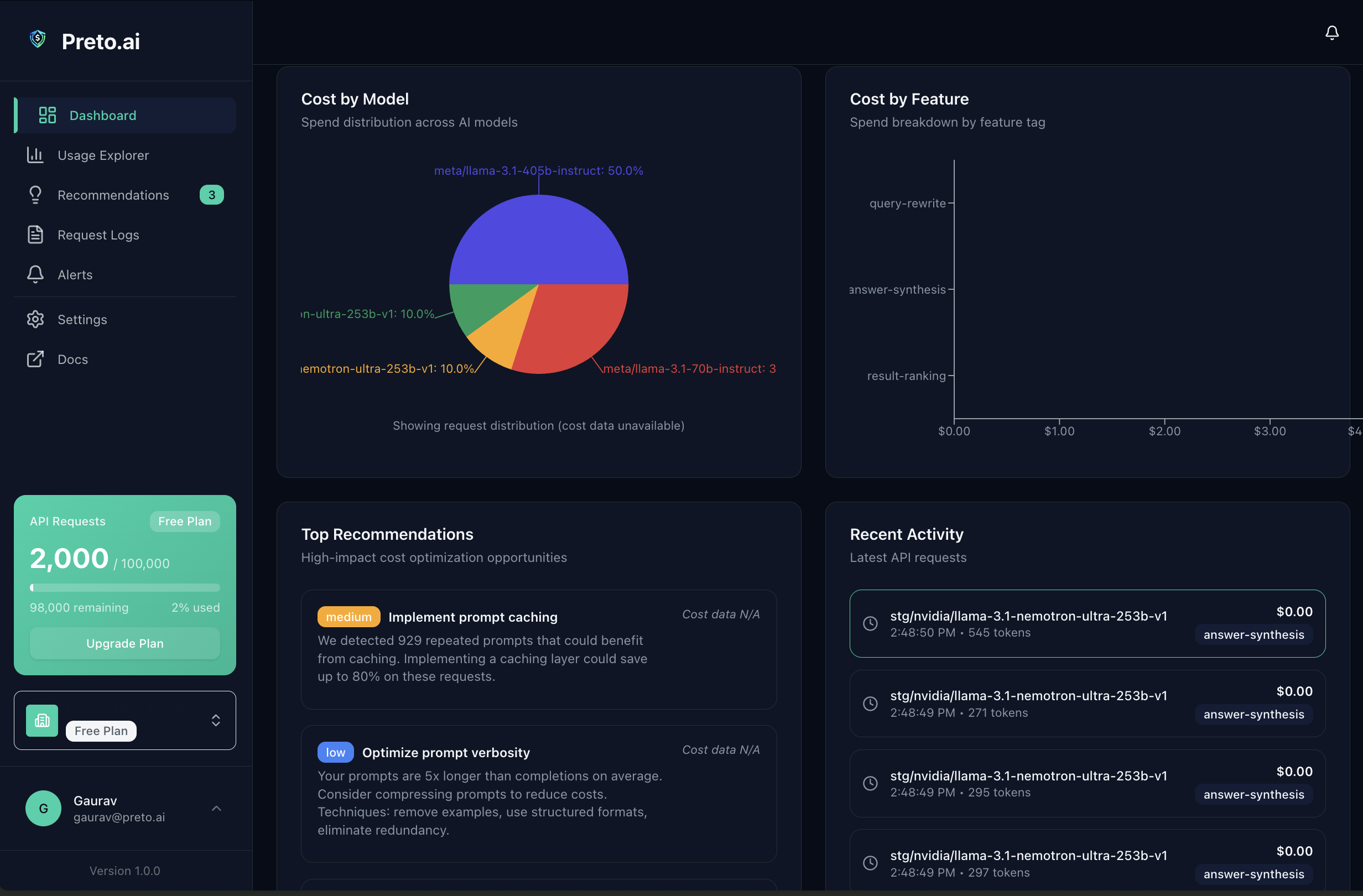
Preto.ai savings dashboard showing cost breakdown by feature and AI recommendations

Not another observability tool.
A savings engine.

Helicone shows you what you spent. Preto tells you what to do about it — and tracks the money you got back.

📊

Real-Time Cost Tracking

Every request logged with model, tokens, cost, and latency — broken down by feature, user, and environment. Finally know exactly where every dollar goes, not just the monthly total.

💡

AI-Powered Recommendations

Five AI rules analyze your traffic across OpenAI and Anthropic: model downgrade opportunities (GPT-5 → GPT-5 Mini, Sonnet → Haiku), duplicate caching, cheaper embeddings, prompt optimization, and rate limit waste. Each finding includes projected monthly savings — ranked by impact.

💰

Savings Dashboard

The metric your CFO actually wants: "Money saved this month: $4,234." Not another cost dashboard — a savings engine with measurable, attributable ROI you can show in a weekly standup.

🛡️

Budget Enforcement

Set hard spend limits per workspace. Get alerted before you hit them — or configure Preto to hard-block requests when the threshold is crossed. Never get a surprise $10K bill again. Infrastructure, not just alerts.

This is what a $1,240/month
finding looks like.

💡 Model Downgrade

Switch simple tasks from GPT-5 to GPT-5 Mini

You're sending 2,300 requests/day to GPT-5 ($1.25/1M input) for tasks under 500 tokens. GPT-5 Mini ($0.25/1M) handles these at equivalent quality — 80% cheaper. This is your highest-impact optimization.

$1,240 estimated savings / month

Preto generates recommendations like this within 24 hours of seeing your traffic. Works across OpenAI, Anthropic, and NVIDIA. Most teams implement their first one within a week.

Find My First Saving →

Free up to 10K requests. No credit card required.

They show you what you spent.
We show you what to do about it.

Helicone Langfuse LangSmith OpenRouter Preto.ai
Cost Attribution (by feature/user) Manual tags Partial
AI Recommendations
Savings Dashboard
Budget Enforcement Alerts only
Auto Model Routing Coming soon
Keep Your Own API Keys Optional BYOK
1-Line Integration

Pay $99. Save thousands.

Pro pays for itself the first time you implement a recommendation.

Monthly Annual Save 20%
Free
$0 / forever
See your first AI cost breakdown in minutes. Free forever.
  • 10,000 requests / month
  • 1 user
  • 7-day data retention
  • Cost tracking + basic recs
Start Free →
Business
$399 / month
For teams with real AI spend. Budget enforcement + multi-provider analytics.
  • 2M requests / month
  • Unlimited users
  • 1-year retention
  • Budget enforcement + SSO
Start Business Trial →
Scale
$999 / month
For companies where AI is core infrastructure.
  • Unlimited requests
  • Unlimited users
  • 1-year retention
  • Dedicated support + custom integrations
Contact Sales →

Questions we get asked
before teams integrate.

How does Preto reduce OpenAI API costs?
Preto sits between your app and your LLM provider (OpenAI, Anthropic, or NVIDIA) as a transparent proxy. It logs every request with cost, model, and latency data, then runs 5 AI analysis rules to surface your highest-impact optimizations — model downgrade opportunities, cacheable duplicates, cheaper embedding options, and more. Each recommendation includes a projected monthly savings figure so you know exactly what you'll get back before you make any change.
How is Preto different from Helicone?
Helicone provides LLM observability, cost tracking, and model routing — it shows you what you spent and can route traffic. Preto goes further: it analyzes your traffic patterns and tells you exactly what to change, with ranked dollar estimates per recommendation, and tracks the money you actually saved. Both enforce budgets, but only Preto identifies *why* you're overspending and tells you the specific changes that will save you 40–60%. Think of Helicone as the dashboard and Preto as the optimization engine.
How long does integration take?
Integration requires changing one line of code — your OpenAI base_url. No SDK to install, no agents to deploy, no architecture changes. Most teams complete integration in under 10 minutes. You'll see your first cost breakdown within minutes of your first request flowing through.
Will Preto slow down my application?
Preto uses async logging so analysis never blocks the critical path. At p95, it adds less than 50ms of latency to your requests — and in practice most teams see under 20ms. Your users will not notice the difference, and we publish our latency metrics publicly so you can verify.
Can Preto enforce a hard budget limit on AI API spend?
Yes. You can set a monthly spend budget per workspace. When your spend hits the threshold, Preto can alert your team via email or Slack — or hard-block further requests from being forwarded to the LLM provider entirely. Both modes are configurable per workspace, so you can alert on one environment and block on another.
How is Preto different from OpenRouter?
OpenRouter is an API gateway — you send requests through them and they pick the model. You pay OpenRouter, not your provider directly. Preto is a cost intelligence layer — you keep your own API keys and provider relationships, and Preto shows you where every dollar goes plus how to cut 40–60%. OpenRouter routes. Preto optimizes. They can even work together: route through OpenRouter for model selection, observe through Preto for cost intelligence.

Stop guessing where your
AI budget goes.

10K requests free. Setup takes 5 minutes.

No credit card. Free up to 10K requests. Cancel anytime.

Prefer a walkthrough? Email gaurav@preto.ai and we'll set one up.